
Table of Contents
- Why a GPU Dedicated Server Beats Shared Resources for Deep Learning
- AI Model Training Hardware Requirements: What Actually Matters
- Best GPU for Deep Learning in 2026: Matching Cards to Workloads
- GPU Server vs Cloud GPU Instances: Cost, Control, and Latency
- Cost-to-Performance Benchmarking: How to Compare Real Value
- Migration and Setup: Moving Deep Learning Workloads Without Chaos
- Security and Compliance for AI Workloads on Dedicated Hardware
- Frequently Asked Questions
Last Updated: September 14, 2026
Why a GPU Dedicated Server Beats Shared Resources for Deep Learning
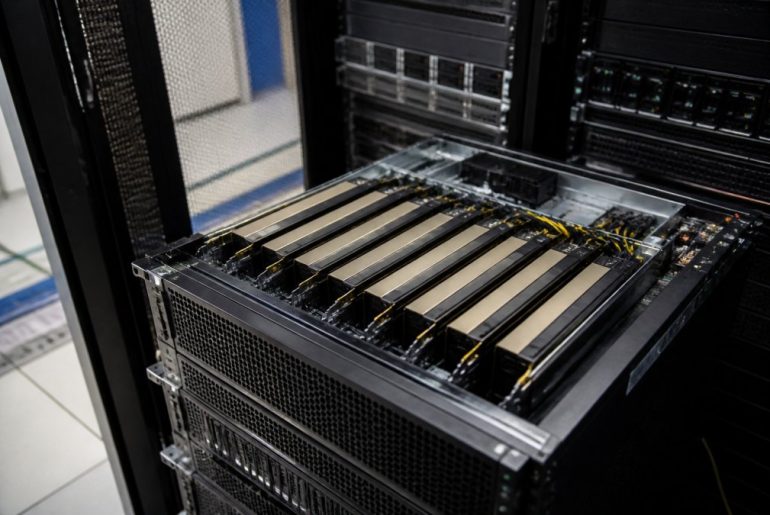
A gpu dedicated server for deep learning gives your models exclusive access to every GPU, core, and byte of VRAM, which matters because deep learning workloads are brutally sensitive to contention. When another tenant spikes memory bandwidth or grabs the PCIe lanes your training job depends on, your throughput collapses and your epochs crawl.
At ServerPronto, we’ve provisioned infrastructure for teams running everything from fine-tuning to large-scale inference, and the pattern is consistent: workloads that stall on shared resources rarely stall because of raw compute. They stall because of noise.
Here’s the part most guides miss: shared and virtualized GPU environments don’t just slow you down, they make your results non-reproducible. A training run that takes four hours on Tuesday can take seven on Thursday, and you can’t tell whether it was your code, your data, or the neighbor’s batch job (Dynamic performance-Energy tradeoff consolidation with contention-aware resource…).
Dedicated hardware removes that variable: predictable memory bandwidth, consistent PCIe throughput, and full control over driver versions, CUDA toolkits, and framework builds.

Dedicated GPU hardware doesn’t just run faster. It makes your results reproducible, which is the difference between an experiment and a product.
AI Model Training Hardware Requirements: What Actually Matters
Three specifications decide whether a GPU server will handle your training workload: VRAM capacity, floating-point throughput, and memory bandwidth. Everything else is secondary.
VRAM determines the largest model and batch size you can fit without gradient checkpointing or model sharding. TFLOPS (FP16 or BF16 for training) determines how fast each step runs. Bandwidth determines how quickly data moves between GPU memory and compute units, the spec most buyers ignore until they hit a wall.
VRAM, TFLOPS, and Bandwidth: The Three Numbers That Decide Your Build
A rough framework that holds up in practice:
- Under 24 GB VRAM: fine-tuning small transformers, computer vision models, and inference at the edge
- 24-48 GB VRAM: most mid-size language model fine-tuning, multi-modal work, and production inference
- 80 GB VRAM and above: full-parameter training on large models, long-context workloads, and multi-GPU parallelism
A common mistake is buying on TFLOPS alone. A card with enormous compute throughput but limited VRAM sits idle waiting on memory transfers. Match VRAM to your model first, then throughput.
Best GPU for Deep Learning in 2026: Matching Cards to Workloads
The best GPU for deep learning in 2026 depends on whether you’re training or serving. These are different jobs with different bottlenecks, and the card that wins one often loses the other.
Training vs. Inference: Different Jobs, Different Cards
Training rewards raw throughput, large VRAM, and high-bandwidth interconnect. Inference rewards low latency, efficient memory use, and high concurrency. A card optimized for one is rarely optimal for the other.
| Workload | VRAM Priority | Key Spec | Best Fit |
|---|---|---|---|
| Small model fine-tuning | 16-24 GB | FP16 throughput | Single mid-range card |
| Large model fine-tuning | 48-80 GB | Memory bandwidth | Multi-GPU node |
| Production inference | 16-48 GB | Latency, concurrency | Inference-optimized card |
| Multi-GPU training | 80 GB+ | NVLink/interconnect | Cluster with fast fabric |
The Cards You’ll Actually See Quoted in 2026
Vendors speak in tiers rather than model numbers, which makes comparison hard. Here’s the practical mapping most AI engineers use when sizing a build:
- Entry tier (16-24 GB VRAM): small transformer fine-tuning, computer vision, and single-stream inference. The right starting point if your model fits and you aren’t running multi-GPU jobs.
- Mid tier (24-48 GB VRAM): the workhorse class for mid-size language model fine-tuning, multi-modal work, and production inference. Where most teams land after outgrowing a single entry card.
- High tier (80 GB VRAM and above): required for full-parameter training on large models, long-context workloads, and tensor parallelism across GPUs. Here interconnect stops being optional.
A common mistake is buying on TFLOPS alone. A card with enormous compute throughput but limited VRAM sits idle waiting on memory transfers. Match VRAM to your model first, then throughput, then interconnect.
Why Interconnect Becomes the Bottleneck at Multi-GPU Scale
This is the part most buying guides skip, and it decides whether your second GPU doubles throughput or just doubles your power bill.
When you train across multiple GPUs, gradients and activations move between cards on every step, over one of two paths:
- PCIe: the general-purpose bus every server has. Bandwidth is shared with storage, networking, and other devices, measured in tens of GB/s per card. Fine for data-parallel jobs with small models, but it becomes the wall once you need frequent all-reduce operations.
- NVLink: a direct, high-bandwidth GPU-to-GPU link that bypasses PCIe entirely. It moves data at a multiple of PCIe bandwidth and lets GPUs share memory directly, which makes tensor parallelism and large-model sharding practical.
The practical consequence: a two-GPU node over PCIe may deliver well under 2x the throughput of a single card on a communication-heavy job, while the same node with NVLink can approach linear scaling. If you plan to train models that don’t fit on one card, interconnect determines whether the second GPU was worth buying.
NVIDIA NVLink and NVSwitch technical overview
VRAM decides whether your model fits. Interconnect decides whether adding a second GPU actually makes it faster. Buy VRAM first, then confirm the interconnect path before you scale out.
Coming from a cloud instance, the biggest surprise is interconnect speed. On a dedicated node with NVLink or high-speed PCIe, gradient synchronization across GPUs is dramatically faster than over a network fabric, and that shows up directly in your cost per training run.
GPU Server vs Cloud GPU Instances: Cost, Control, and Latency
Cloud GPU instances win on elasticity. A gpu dedicated server wins on cost predictability, control, and latency, and for steady-state workloads the gap is significant.
Cloud providers bill by the hour, and those hours add up fast during continuous training or always-on inference. Dedicated hardware converts that variable cost into a fixed monthly figure you can plan around: no per-egress charge, no surprise overage, no spot instance reclaimed mid-epoch.
Control is the other differentiator. A dedicated server gives you full root access, so you install the exact CUDA version, framework build, and driver your workload needs. Managed cloud instances often lock you to what the provider supports.
Latency matters most for inference. A dedicated server in a well-connected facility delivers consistent response times because nothing else competes for the same resources.
The most expensive mistake teams make when leaving cloud is assuming migration is a lift-and-shift. Driver versions, CUDA compatibility, and container images all need to be validated on the new hardware before you cut over.
Cost-to-Performance Benchmarking: How to Compare Real Value
Cost-to-performance benchmarking means dividing total monthly cost by the useful compute you actually get, not the spec sheet number. A cheaper GPU that sits idle waiting on memory transfers is worse value than a pricier one that stays saturated.
The Formula
Cost per useful unit of work = (monthly hardware cost + migration cost amortized over 12 months + expected downtime cost) ÷ measured throughput on your model
Measured throughput is the number that matters, and it’s the one vendors never give you. You have to produce it yourself.
How to Measure Effective Throughput
- Pick a representative job. Use a real model from your pipeline, not a synthetic benchmark, a small transformer fine-tune or fixed inference batch works well.
- Fix the variables. Same dataset, batch size, precision (FP16 or BF16), and number of steps.
- Record wall-clock time per step and samples per second at steady state, discard the first 50-100 steps so warmup doesn’t skew the average.
- Repeat on each candidate server and note whether the GPU stayed saturated.
A Worked Comparison
The Costs the Spec Sheet Hides
A 12-Month Horizon, Not a Single Month
Build a one-page spreadsheet with columns for monthly cost, measured samples per second, migration hours, and expected uptime. Fill it in for every candidate before you decide. The spreadsheet, not the spec sheet, is what makes the choice defensible to your finance team.
Migration and Setup: Moving Deep Learning Workloads Without Chaos
A migration path that works:
Use Docker or Anaconda to pin your environment. A container built on the new server becomes the single source of truth for your stack, and it makes any future migration a rebuild rather than a rebuild-from-memory.
Security and Compliance for AI Workloads on Dedicated Hardware
Frequently Asked Questions
Which GPU is best for deep learning in 2026?
The best GPU for deep learning depends on your workload. For training large neural networks, cards with 24GB or more VRAM and high TFLOPS ratings handle bigger batch sizes and deeper models. For inference, lower-VRAM cards with strong throughput often deliver better cost-per-result. Match the card to your model size, framework (TensorFlow, PyTorch), and whether you need FP16 or FP32 precision. A dedicated server lets you pick the exact card without sharing it.
Do I need a GPU for a dedicated server?
Only if your workloads benefit from parallel processing. Deep learning training, inference, rendering, and data analytics all run dramatically faster on GPUs than CPUs. If you run standard web hosting, databases, or APIs, a CPU-only dedicated server is sufficient and costs less. For AI model training or fine-tuning, a GPU dedicated server cuts job times from days to hours.
How much VRAM do I need for deep learning models?
VRAM needs scale with model size and batch size. Small models like MobileNet or BERT-base train comfortably in 8-12GB. Mid-size transformers and image models often need 16-24GB. Large language models and high-resolution vision models require 40GB or more, sometimes across multiple GPUs. If you hit out-of-memory errors, reduce batch size or move to a card with more VRAM. Multi-GPU setups with NVLink help when a single card is not enough.
What is the difference between training and inference GPU servers?
Training servers prioritize raw compute, high VRAM, and fast interconnect to handle large datasets and backpropagation across many epochs. Inference servers prioritize low latency, high throughput, and power efficiency because they serve predictions to users in real time. A training-optimized GPU can run inference, but a dedicated inference card often delivers better cost-per-query. Many teams use separate servers for each stage.
Moving deep learning workloads off shared or cloud infrastructure is a real project, and the teams that get it right are the ones who plan for validation, not just provisioning. ServerPronto gives you exclusive GPU resources, full root access, and month-to-month billing with no contracts, backed by a 100% uptime guarantee and 24/7 on-site technicians. Build your configuration and see the difference dedicated hardware makes for your models.