
Be a Minecraft Server Admin on the ServerPronto Cloud
Play your favorite game and host your friends on our reliable and lightning fast ServerPronto Cloud. With our instant setup and turn-key installation you can be up and gaming within minutes. Experience no lags and zero downtime on our high availability cloud hardware infrastructure. With full Administrator access you control the game and the players on your server - become a Minecraft Server Admin today.
Minecraft Hosting - Done Right


Choose your package
Select your server by the number of players you want to host. Upgrades are available at any time.



Easy to use Minecraft Control Panel
Choose between the two most commonly used Minecraft Admin Cotrol Panels, McMyAdmin and Multicraft. These GUI cotrol panels make it easy to manage your Minecraft server and the players in your world. Add plugins, install mod packs and make backups of your world with a few clicks, ServerPronto's Minecraft packages come with the free license of the control panel of your choice.
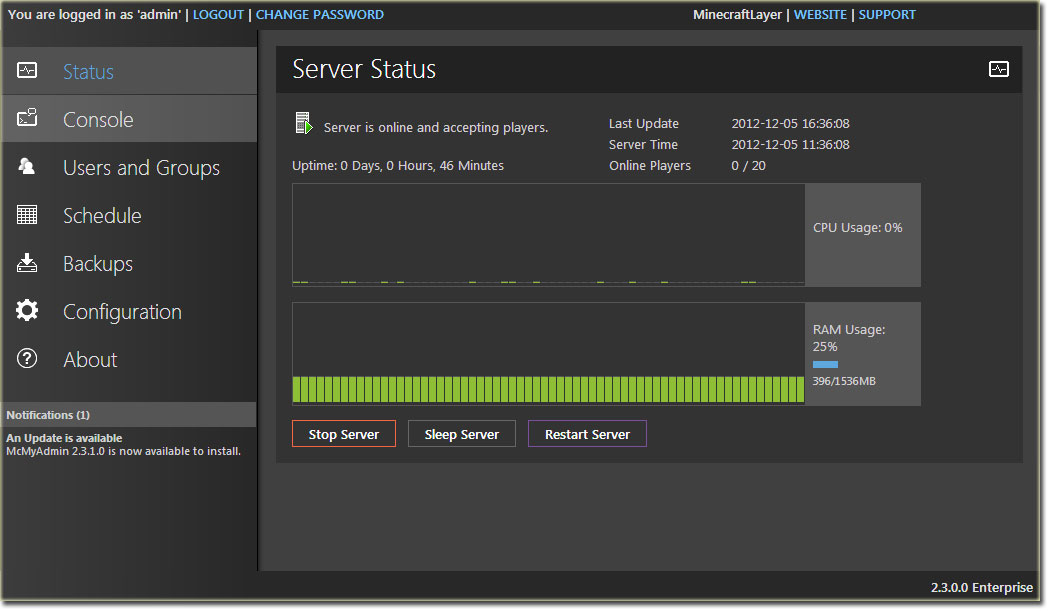
With full root access on any Minecraft server package you can also install any other control panel or application as you please.
No Control Panel - No Problem
You can also order our Minecraft servers as bare-metal cloud servers with only the Minecraft server client pre-installed. Without a control panel, you can manage your Minecraft game with just a view command line commands, seen below.
For servers without a control panel:
1. Login via ssh.
2. Type ”./start” to start the server.
3. To add your Minecraft user as an administrator of the Minecraft server type “op username”.
4. You can now connect to the server with your Minecraft client software.
5. From the ssh interface (CLI – command line interface) type “help” for local commands that can be issued at the server.
6. Other commands with similar format are “stop”, “deop”, “ban”, “gamemode” (0 for standard 1 for creative).
7. Anti-Griefing/Rollback- To rollback the world to a previously saved version, stop the game and type “./rollback”. Hourly backups for the last 30 days, or however long the server has been active) will be displayed.
Get a Minecraft server and start piling blocks and create your world today!

